Premium Managed Offices
Key takeaways
- A GCC usually works under the parent's information-security policy, so the office must satisfy the parent's CISO, not just the local team.
- Private means lockable and access-controlled, not just a desk in a quiet corner. Ask exactly what separates your space from other tenants.
- Physical, network and process controls all matter: badge access, camera policy, visitor handling, dedicated or segmented network, clean-desk and shredding rules.
- Ask for rights, not assurances: tour access for the security team, a written description of controls and the ability to agree reasonable audit steps.
- Never assume a certification. If a requirement depends on a standard or audit, ask the operator what it can document and verify it.
- Small does not mean lax: a Nano GCC with high-impact compact teams often handles the same sensitive work as a large center, so it needs the same security baseline from day one.
The first person from the parent company to walk through a new GCC office is often not the CEO. It is the chief information security officer, or someone from their team, with a checklist. They are not asking whether the space looks good. They are asking whether it is possible to work on the parent's data there, and what would have to change if the answer is no.
That is why security is the question that most often makes or breaks an office choice for a GCC, and why it deserves to be raised in week one rather than week eleven. This post gives you a practical checklist. It is general guidance rather than a compliance standard, and your own security policy takes precedence. Where an operator should be able to show you something, we say so.
Why a GCC office is a security decision
A GCC is, by design, an extension of its parent. Its employees use the parent's systems, access the parent's data and work under the parent's policies. Industry reports from Nasscom and Zinnov describe Indian centers increasingly owning core product, analytics and AI work, which tends to raise the sensitivity of what is handled locally. An office is where that sensitive work physically happens. A weak lock, an open Wi-Fi network or an unattended printer can undo careful engineering controls elsewhere.
The good news is that a private, managed office can satisfy most security baselines, as long as you ask precise questions. Vague answers such as “it is very secure” are not answers. Specific descriptions, and permission to verify them, are.
Layer one: physical access
What “private” should actually mean
- A lockable boundary. A cabin or suite with a door that locks and that only your people can open. A desk in a shared room is not private.
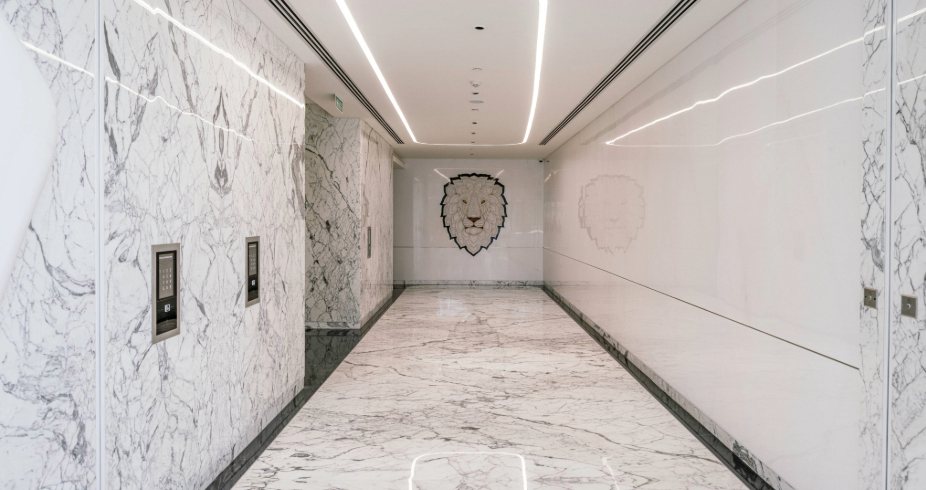
- Badge or credential-based access to the building, the floor and your space, with a log that can be reviewed.
- Defined hours and after-hours rules. For teams working across time zones, 24x7 access is useful, but it should come with clear rules on who can enter at night.
- Camera coverage of entrances and common areas, with a clear policy on retention and on not recording inside your private space.
- Key and badge governance: who issues, who revokes, how quickly.
Layer two: visitors and people flow
Most physical security incidents involve someone who was allowed in by mistake rather than someone who broke in. A GCC needs to control the flow of guests, contractors and delivery people, particularly in a managed building where the reception serves several tenants.
- Pre-registration: guests are announced by an authorised employee before arrival.
- Reception checks: identity is verified and a temporary badge is issued.
- Escort rules: guests are accompanied in areas where they should not wander.
- Logs: visitor entries are recorded and retrievable.
- Vendor and contractor access: housekeeping, maintenance and IT vendors have defined windows and supervision for your space.
Layer three: network and IT
In a conventional lease, you control the network. In a managed office, the operator may provide internet and Wi-Fi by default, which is convenient and a potential issue. Ask:
- Can we have a dedicated internet circuit, or a segmented VLAN, so our traffic does not share a network with other tenants?
- Who manages the firewall, and can we run our own?
- Can we install our own access points and network equipment inside our space?
- Where do cables and network equipment sit, and who has physical access to them?
- What is the policy on printers and shared devices, and can we use our own managed print setup?
The point is not that a managed operator’s default network is unsafe. It is that your policy probably requires a network you control or can configure. A good operator will have answered this question many times.
Layer four: process and housekeeping
The small controls that cause the big findings
- Clean-desk and clear-screen rules that housekeeping staff can respect.
- Waste and shredding: how confidential paper leaves the space.
- Housekeeping access: when cleaners enter your space, whether they are supervised and whether you can lock sensitive areas.
- Meeting rooms: whether whiteboards are wiped, whether bookings are private and whether rooms are sound-isolated.
- Incident reporting: how quickly the operator tells you about a lost badge, a break-in attempt or a power failure.
| Area | Question | Good answer looks like |
|---|---|---|
| Physical boundary | What separates our space from other tenants? | Lockable door, badge-controlled, written description |
| Access logs | Can we review who entered our space? | Yes, on request, with a defined retention period |
| Visitors | How are guests registered and escorted? | Pre-registration, ID check, temporary badge, log |
| Network | Can we have a dedicated or segmented network? | Yes, with clear ownership of firewall and equipment |
| Housekeeping | When do cleaners enter our space? | Defined hours, supervised, lockable sensitive areas |
| Inspection | Can our security team inspect before we sign? | Yes, with a tour and a documented description of controls |
Certifications and audits: ask, do not assume
Parent companies sometimes require that facilities hold specific certifications or accept an audit. These requirements vary widely, and a space that suits one company's policy may not suit another’s. We do not make blanket claims about certifications in a blog post. If your policy requires a specific standard, ask the operator to state, in writing, what it holds and what it can document, and verify it independently.
It is also reasonable to ask for a defined audit right: a visit by your security team once or twice a year, with notice, that does not disrupt other tenants. Operators accustomed to corporate clients are usually comfortable with this.

When a private office is not enough
Some work demands more than a managed private office can offer: hardware labs, regulated data environments, secure development areas with no mobile phones or very strict network isolation. If your function needs that, a dedicated floor or a built-to-suit environment is likely the right answer, and our comparison of managed private offices and lease-and-fit-out covers the trade-off. Many GCCs split the work: sensitive functions in a built environment, the rest in managed space.
Why a Nano GCC still needs enterprise-grade security
A Nano GCC is small in headcount but not in responsibility. High-impact compact teams frequently own the most sensitive work, such as core product code, models or financial processes, which is precisely why the parent put them there. Your CISO will not lower the baseline because the team is twelve people.
The upside of a compact team is that the security perimeter is small: one lockable suite, a defined list of badge holders, one network segment and a short visitor list. That is easier to inspect, test and audit than a 200-seat floor, provided the operator can describe each control clearly.
Devices and the working day
Security does not stop at the door. What people do inside the space is just as important, and a managed office should make the right behaviour easy.
- Managed devices only: your IT team controls laptops and mobile devices, with encryption and screen locks. The office should not require you to connect unmanaged equipment.
- Printing and scanning: a policy on whether printing is allowed, and a secure, badge-released printer if it is.
- Screens and calls: layouts that avoid visitors or passers-by seeing screens, and rooms for sensitive calls.
- Phones and recording: clear rules on mobile phone use in sensitive areas.
- Lost items: a simple route for reporting a lost badge or laptop within minutes, not days.
Plan for the bad day
A security review that looks only at normal operations misses the cases that test a space. Ask the operator to walk through what happens when something goes wrong.
Scenarios worth rehearsing
- A badge is lost or stolen. How quickly is it disabled, and by whom?
- The power fails. What is on backup, for how long, and does access control keep working?
- An unrecognised person is found in your area. Who do your staff call, and how long does response take?
- A fire alarm or evacuation occurs. How are your people accounted for, and how are devices and documents protected?
- A vendor needs urgent access. What is the process outside business hours?
The quality of the answers tells you more about an operator than any brochure. Operators who run hundreds of corporate seats usually have rehearsed responses, and are happy to share them.
How QAARYA approaches the conversation
At M3M IFC, DLF Building 14 and AIPL Masterpiece, QAARYA offers private cabins with 24x7 member access, reception, housekeeping, power backup and meeting rooms as part of one monthly fee plus GST. We encourage prospective teams to bring their security lead on the tour, ask the questions above and see the space during and after business hours. We will describe what we can and cannot offer for your specific requirements, and we would rather lose a tour than overpromise on a control.
To plan the security conversation as part of the wider launch, read the first-90-days office checklist, then see what separates a premium managed office from an ordinary one, and book a tour that your CISO can attend.
Planning a global capability center in Gurugram? See QAARYA's private office solutions for GCCs, or talk to the team on +91 96504 98482.
Frequently asked questions
What security should a private office offer a GCC?
A private office for a GCC should offer a lockable room or area, badge-controlled access, managed visitor registration, camera coverage of common areas, network segmentation or a dedicated connection, and clear rules on clean desk, printing and waste. The specifics should match the parent company's security policy.
Can a managed office meet a parent company's security requirements?
Often yes, if the operator can document its physical and network controls and allow the tenant's security team to inspect them. Requirements that need a fully isolated environment, such as a lab or a dedicated floor, may need a bespoke solution.
Should a GCC use a dedicated internet connection?
Many GCCs request a dedicated internet circuit or a segmented network so that their traffic is not shared with other tenants. Ask the operator what is possible, how it is configured and who manages the firewall.
How should visitors be handled in a GCC office?
Visitors should be pre-registered, checked at reception, issued temporary badges, escorted where needed and logged. The tenant's security policy should define who can approve a visitor and which areas they may enter.
What should a CISO ask on a managed office tour?
A CISO should ask about access control, camera coverage, visitor flow, network separation, cleaning and waste handling, incident reporting, after-hours rules and whether the tenant can inspect and test the space before committing.
Does a Nano GCC need the same security as a large GCC?
Often yes. A Nano GCC with high-impact compact teams may own sensitive product, data or financial work, so its parent company's security policy applies from day one regardless of headcount. The advantage is that a small, lockable private office is easier to secure and audit.